Tricks to work around nested form elements, for Rails
I recently migrated GoodJob’s Dashboard from Rails UJS (“Unobtrusive Javascript”) to Turbo. One of the most significant changes for me of moving from UJS to Turbo is that UJS’s data-method is not functionally replaceable with Turbo’s data-turbo-method. This -method attribute allows you to make a button or link act like a form submission without using a<form> element.
I learned some stuff, but first let’s back up even further
HTML <forms> are hard
There’s three practical things, and one conceptual, that are going to challenge us here
You cannot nest a <form> element within another <form> element. When rendering the page, the browser will remove it, or ignore it; regardless it won’t work. Doubly annoying because Chrome’s DevTools will simply remove the element; you have to use view-source to witness your mistake.
Some designs would really benefit from a form nested in another form. For example: You have a screen with a bunch of inputs to update a record, and you want to put a “Destroy” button visually adjacent to the “Update” button. Or, for example: you are displaying a list of records that is wrapped entirely in one big form element so that each item can be checked/unchecked to apply actions upon multiple records and you want to be able to have buttons to perform actions on records individually in the list too. Remember, you always want to put destructive or mutating actions behind a POST button rather than a GET link. It can be tricky. Here’s an example of a design challenge in the GoodJob Dashboard:
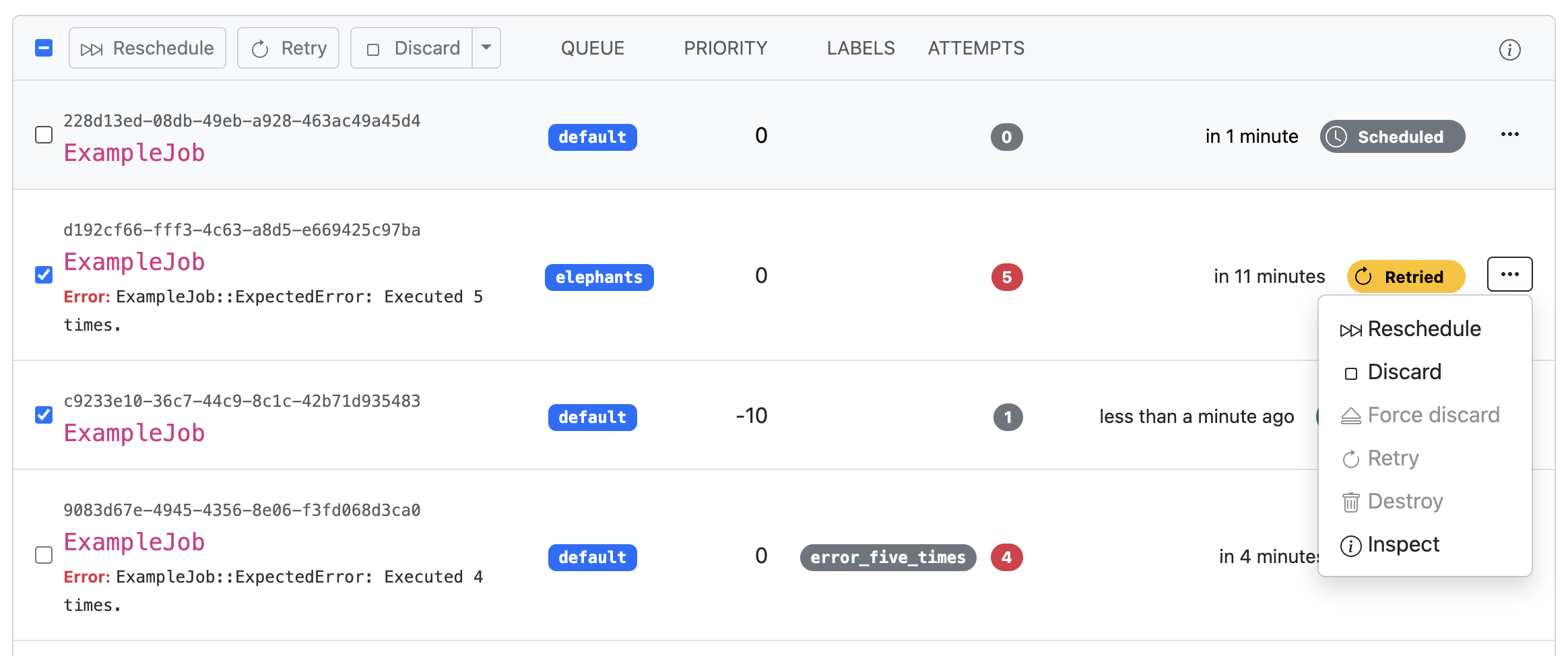
HTML forms only support two HTTP methods: GET and POST. All the other one’s (PUT, PATCH, DELETE ) are valid HTTP methods, but you can’t use them in an HTML form. Rails works around this with its form helpers by adding a hidden input named _method that puts the unsupported method in the formdata, or using Javascript fetch or XMLHttpRequest.
You need a CSRF token. The form payload must contain the CSRF token payload, which Rails form helpers include as a hidden form element. If the payload doesn’t have a CSRF token, Rails will reject it. THe CSRF token really is important, please don’t disable it. Maybe that’ll go away someday, but not today
Conceptually, I want to leave you with this: Despite Ruby on Rails being a very good monolithic framework, we must clearly distinguish the HTML Documents and HTTP payloads from the Ruby bits and helpers.. In this case, we’ll be focusing more on:
- The actual HTML document that the browser will render… over the ERB and Ruby Helpers that can make it easier to author that document.
- The precise HTTP request and form-data payload that a form or javascript produces to send back to the server… over the Form Helpers and superficial Turbo interface.
- How that HTTP request and form-data payload is processed by the Rails and Rack-middleware stack… over the pretty little Ruby hashes and objects you’ll access inside your Controller Actions.
The intent here is not to throw shade at Ruby on Rails. I want to break through what I have sometimes seen from developers who treat Rails like a native app SDK that paints UI on their screen and tightly responds to user input though OS interrupts or something. I want to elevate the HTML Document and HTTP requests that are buzzing back and forth and the limitations and opportunities therein.
Throw out your UJS data-method
As I mentioned in the intro, migrating from UJS to Turbo has some changes. In UJS, the simplest thing to do was use data-method and data-params for anything extra:
<a href="/posts/draft" data-method="put" data-params="something=extra" class="button">Set Draft</a>
…and that would generate a form-like HTTP request with all the bits: the _method , your CSRF token, and the extra data attributes:
POST /posts/draft
_method=put
authenticity_token=alsdkfjasldkjfasdljkf
something=extra
But seems like Turbo is giving up on data-turbo-method , and Turbo never implemented a data-params equivalent. So we have to do something different.
Alternatives for your consideration
Depending on what you need to change about the payload, you have some options:
If you only want to know if someone clicked Button B instead of Button A, then use a different commit value for the button; commit is just the arbitrary name the Rails framework chose to put in the form-data:
<%= form_with model: @post do |f| %>
  <%= f.button "Publish", name: "commit", value: "publish" %>
  <%= f.button "Save Draft", name: "commit", value: "draft" %>
<% end %>
…and then do your controller logic based on the params[:commit] value. Buttons can have any single name and value and it goes into the form-data.
We can overload this if we only need to change the method. E.g. if we want to have our Delete button alongside, we can use our knowledge of the magic _method overloading to set the method to be treated like a DELETE.
<%= form_with model: @post do |f| %>
  <%= f.button "Update" %>
  <%= f.button "Delete", name: "_method", value: "delete" %>
<% end %>
This produces an HTTP payload that looks like what we want, though it includes all the other form inputs:
POST /posts/42
_method=put
authenticity_token=alsdkfjasldkjfasdljkf
title=What was in the form
body=Anything else in the form
_method=delete
This works perfectly fine because the Form URL for both the update and destroy actions are the same, and it’s only the _method method that’s different and who cares about some extra form-data we won’t use.
But what about the duplicate _method keys? Rails (or maybe Rack). when it comes to duplicate keys, will expose only the last value in the params hash. It’s only if you named the key with square brackets like foo[] does it become an array of values. This isn’t HTTP, but rather a convention of Rails/Rack for parsing form-data into Ruby data objects.
If we want a different URL, we can use HTML’s formaction= attribute to change where the Form is posted:
<%= f.button "Fancy Delete", name: "_method", value: "delete", formaction: fancy_post_path(@post) %>
…which leads to HTML that looks like:
<form action="/posts/42">
  <input type="hidden" name="_method" value="put">

  <button>Save</button> <!-- the regular form button -->
  <button name="_method" value="delete" formaction="/posts/42/fancy">
    Fancy Delete
  </button>
</form>
Pretty sweet!
One more tool in our toolbox: In addition to formaction which changes the payload target URL, we can redirect our button to an entirely different form using the form= attribute on the button and targeting the other form by id:
<form action="/posts/42" method="POST">
  <input type="hidden" name="_method" value="put">

  <button>Save</button> <!-- the regular form button -->
  <button name="commit" value="delete" form="fancy_delete_form">
    Fancy Delete
  </button>
</form>

<form id="fancy_delete_form" action="/posts/42/fancy" method="POST">
  <input type="hidden" name="_method" value="put">
  <input type="hidden" name="foo" value="bar">
</form>
In this case, we can include several more values in our payload in the external form. The downside here is that the HTTP payload won’t include any of the data from the primary form, only the inputs within the targettedform=.
Almost but not quite equivalent
We can cover these scenarios:
- Want to change a method or single value or single URL: add some attributes to the button.
- Want to submit multiple different values to a different place: use the
form=attribute. - Want to submit both the original form’s data and multiple other values…. I don’t know how to do that easily. With UJS you could slot those key-values into
data-params, but Turbo doesn’t have an equivalent. I encounter this very very rarely. I guess… put them in the query parameters?… Stimulus?